


digitalmars.D.announce - Sciter for D
- c-smile (24/24) May 14 I've almost done with D version of [Sciter](https://sciter.com)
- Steven Schveighoffer (5/8) May 14 Yes, this does look interesting! Never heard of sciter before.
- c-smile (213/221) May 14 Sciter is used in production since 2007 when it first used as UI
- Paolo Invernizzi (9/18) May 15 I remember "Terra Informatica"!
- Vladimir Marchevsky (5/12) May 14 Sounds great. Having some quick, cross-platform, easy to start
- Lance Bachmeier (4/11) May 16 I saw Sciter mentioned many times when I was looking for an
- c-smile (13/15) May 16 I've published [Sciter v
- c-smile (20/22) May 19 Published Sciter SDK v 6.0.4.1 with new options for Sciter+/D:
- Dejan Lekic (193/195) May 25 HTML5, CSS3, DOM, JS for a GUI application is absolutely not
- c-smile (33/38) May 25 But nevertheless you provide a sample that uses DOM and CSS 😛.
- Dejan Lekic (9/33) May 26 The only thing GTK "stole" from the web is CSS. It looks to me
- c-smile (16/26) May 26 widget tree is DOM tree by any means.
- Dejan Lekic (5/9) May 26 So what will it use on my colleague's BSD running Window Maker
- Dejan Lekic (29/30) May 26 Sorry but I had to comment on this nonsense.
- c-smile (48/65) May 26 GTK has exactly the same set of DOM/WOM tree mutating operations
- Dejan Lekic (23/24) May 26 When i said DOM I should have said DOM in the sense of what we


I've almost done with D version of [Sciter](https://sciter.com) SDK.  Is it interesting to anyone in principle? Just in case: Sciter is an standalone and embeddable engine that includes: * HTML5/CSS3 UI runtime; * JS (QuickJS, ES6 compatible) with built-in native JSX, React'or and persistence. * GPU accelerated rendering engine (over DX11/DX12, Metal, OpenGLES); * OpenGLES implementation (and its JS version - WebGL): * Windows and MacOS - over built-in ANGLE; * Linux - native; Platforms: Windows (XP...11, x32/x64 and ARM64), MacOS, Linux (over GTK4 or Wayland or X11, x64 and ARM64). Sciter SDK for D provides: * Access to Window and DOM trees; * Ability to write in D native DOM element controllers; * Ability to extend JS runtime by D resident functions and classes; * Ability to control and handle in D all resource requests; * Native access to Graphics API: Canvas-like 2D, OpenGLES;
May 14

On Thursday, 14 May 2026 at 20:56:22 UTC, c-smile wrote:I've almost done with D version of [Sciter](https://sciter.com) SDK. Is it interesting to anyone in principle?Yes, this does look interesting! Never heard of sciter before. Does this utilize the GC, or are you doing only manual resource management? -Steve
May 14
 c-smile <andrew.fedoniouk gmail.com>
 On Thursday, 14 May 2026 at 21:08:36 UTC, Steven Schveighoffer wrote:On Thursday, 14 May 2026 at 20:56:22 UTC, c-smile wrote:Sciter is used in production since 2007 when it first used as UI front end of Norton Antivirus. Since then quite a lot of customers have joined [the club](https://sciter.com/#customers).I've almost done with D version of [Sciter](https://sciter.com) SDK. Is it interesting to anyone in principle?Yes, this does look interesting! Never heard of sciter before.Does this utilize the GC, or are you doing only manual resource management?D app that utilizes Sciter UI frontend is a normal D application that uses its own GC and all other bells and whistles. That screenshot above is made of this file: ``` module dsciter; import sciter; import application = sciter.application; import archive = sciter.utils.archive; import std.stdio; // custom drawing controller demo import samples.drawingcontroller; //string html = "<html><body>Hello D!</body></html>"; static blob = cast(ubyte[]) import("resources.bin"); string DCompilerName() { version (DigitalMars) { return "DMD (Digital Mars D)"; } version (LDC) { return "LDC (LLVM-based D Compiler)"; } version (GNU) { return "GDC (GNU D Compiler)"; } } int main() { if(!application.start()) return -1; archive.open(blob); struct D { string name; int verMajor; int verMinor; } application.globalVar("Compiler", VALUE( D(DCompilerName(), __VERSION__ / 1000, __VERSION__ % 1000 ))); bool onClick() { writeln("mouse CLICK"); return false; } Window window = new Window(Window.AS_MAIN); //window.on(MOUSE_EVENT.TYPE.CLICK) = &onClick; window.on(MOUSE.CLICK).at("body") = (){ writeln("mouse CLICK"); return false;}; window.on(EVENT.CLICK).at("button#test") = (ref Element button){ writeln("CLICK on ", button.tag); return false;}; // load HTML // wnd.load( cast(ubyte[]) html ); // from literal HTML string window.load("this://app/index.htm"); // from archive based on resource blob // show it window.state = Window.STATE.SHOWN; // run message pump return application.run(); } ``` Where HTML (compiled in app body as archive at this://app/index.htm): ``` <html window-frame="extended" window-resizable="true" window-minimizable="true" window-maximizable="true" window-blurbehind="auto" theme="auto"> <head> <title>Sciter greets D lang!</title> <style> import url(sciter:window-chrome.css); body { margin:0; } h1, div { text-align:center; } dl { flow: row(dt, dd); border-spacing: 0.5em; text-align:start; width:max-content; margin:0 *; } dl > dt, dl > dd { width:max-content; } clock { behavior: custom-drawing-controller; // custom drawing ctl, see samples/drawingcontroller.d display:block; // like a <div> size:*; // spans whole available space } </style> <script> document.body.append(<dl> <header>Compiler</header> <dt>name:</dt> <dd>{Compiler.name}</dd> <dt>version:</dt> <dd>{Compiler.verMajor}.{Compiler.verMinor}</dd> <dt>test:</dt> <dd>{adder(10,32)}</dd> </dl>); </script> </head> <body> <h1>The D Clock</h1> <clock/> <div>Button to <button #test>Test</button></div> </body> </html> ``` And finally D resident controller of custom drawing element (the `<clock>`): ``` module drawingcontroller; import std.datetime; import std.datetime.systime; import std.utf; import core.stdc.stdio : sprintf; import sciter; const float PI = 3.1415926f; class DrawingController : ElementController { this(HELEMENT h) { super(h); } override void didStart() { startTimer(500, &this.onTick); } bool onTick() { self.requestPaint(); // will cause handleDraw() to be called return true; // keep timer ticking } override bool handleDraw(HELEMENT he, ref DRAW_EVENT evt) { if(evt.type != DRAW.CONTENT) return false; // we are drawing only content layer Graphics gfx = evt.gfx; // on this Graphics RECT area = evt.area; // in this area auto w = area.width; auto h = area.height; float scale = w < h? w / 300.0f: h / 300.0f; SysTime now = Clock.currTime(); // this time gfx.stateSave(); gfx.translate(area.left + w / 2.0f, area.top + h / 2.0f); gfx.scale(scale,scale); gfx.rotate(-PI/2); gfx.lineColor(0); gfx.lineWidth(8.0f); gfx.lineCap(LINE_CAP.ROUND); // Hour marks gfx.stateSave(); gfx.lineColor(rgba(0x32,0x5F,0xA2)); for (int i = 0; i < 12; ++i) { gfx.rotate(PI/6); gfx.line(137.0f,0,144.0f,0); } gfx.stateRestore(); // Minute marks gfx.stateSave(); gfx.lineWidth(3); gfx.lineColor(rgba(0xA5,0x2A, 0x2A)); for (int i = 0; i < 60; ++i) { if ( i % 5 != 0) gfx.line(143,0,146,0); gfx.rotate(PI/30.0f); } gfx.stateRestore(); // show current date { gfx.stateSave(); gfx.rotate(PI/2); char[20] buffer; int written = sprintf(buffer.ptr, "%04d-%02d-%02d",now.year,now.month,now.day); Text text = Text.createForElementAndStyle(toUTF16(buffer[0..written]), self, "font-size:10pt;color:brown"w ); gfx.draw(text, 0, 60, 5); gfx.stateRestore(); } uint sec = now.second; uint min = now.minute; uint hr = now.hour; hr = hr >= 12 ? hr - 12 : hr; // draw hours hand gfx.stateSave(); gfx.rotate( hr*(PI/6) + (PI/360)*min + (PI/21600)*sec ); gfx.lineWidth(14); gfx.lineColor(rgba(0x32,0x5F,0xA2)); gfx.line(-20,0,70,0); gfx.stateRestore(); // draw Minute hand gfx.stateSave(); gfx.rotate( (PI/30)*min + (PI/1800)*sec ); gfx.lineWidth(10); gfx.lineColor(rgba(0x32,0x5F,0xA2)); gfx.line(-28,0,100,0); gfx.stateRestore(); // draw Second hand gfx.stateSave(); gfx.rotate(sec * PI/30); gfx.lineColor(rgba(0xD4,0,0)); gfx.fillColor(rgba(0xD4,0,0)); gfx.lineWidth(6); gfx.line(-30,0,83,0); gfx.ellipse(0,0,10,10); gfx.noFill(); gfx.ellipse(95,0,10,10); gfx.stateRestore(); gfx.stateRestore(); return true; } } static this() { registerElementController!DrawingController("custom-drawing-controller"); // ^ for CSS: behavior: custom-drawing-controller; } ```
May 14


On Thursday, 14 May 2026 at 21:08:36 UTC, Steven Schveighoffer wrote:On Thursday, 14 May 2026 at 20:56:22 UTC, c-smile wrote:I remember "Terra Informatica"! They used to have a UI framework, called "Harmonia" made in D, and pretty impressive, we used it for sometimes in my previous company! Then they reverted back to C++ ... some history about that here: https://terrainformatica.com/2014/07/17/10-years-road-to-sciter/ /PI've almost done with D version of [Sciter](https://sciter.com) SDK. Is it interesting to anyone in principle?Yes, this does look interesting! Never heard of sciter before. Does this utilize the GC, or are you doing only manual resource management? -Steve
May 15
On Friday, 15 May 2026 at 07:52:27 UTC, Paolo Invernizzi wrote:They used to have a UI framework, called "Harmonia" made in D, and pretty impressive, we used it for sometimes in my previous company!Good memories, yeah :) Sciter has it roots at Harmonia/D, yes. But D was a moving target at that time so ... As of Sciter/D, progress is quite satisfactory. Spent some time tuning Sciter D SDK for a) LDC and b) MacOSX. This was built from exactly the same source sample:  Conceptually Sciter is close to Electron (or any other webview based UI solution) but with major differences: * Sciter is made with embedability in mind: it means that the app can expose its API to UI layer (Sciter presenting HTML/CSS) in most natural way: ```D int adder(int a, int b) { return a + b; } application.globalVar("adder", VALUE(&adder)); ``` And JS can use it naturally as its own built-in: ``` let theAnswer = adder(10,32); ``` JS, as a language-behind-UI, is quite convenient by its flexibility and married with D (app core logic) creates near the ideal pair as for me.

May 15
On Friday, 15 May 2026 at 16:48:10 UTC, c-smile wrote:Sciter has it roots at Harmonia/D, yes. But D was a moving target at that time so ...Looks cool.
May 15
On Friday, 15 May 2026 at 17:14:18 UTC, Kapendev wrote:Looks cool.And the same app is on Linux / Ubuntu:  On the right side is *inspector* app from Sciter SDK - inspects DOM/CSS/resources and JS debugger.

May 15
On Thursday, 14 May 2026 at 20:56:22 UTC, c-smile wrote:Sciter SDK for D provides: * Access to Window and DOM trees; * Ability to write in D native DOM element controllers; * Ability to extend JS runtime by D resident functions and classes; * Ability to control and handle in D all resource requests; * Native access to Graphics API: Canvas-like 2D, OpenGLES;Sounds great. Having some quick, cross-platform, easy to start and nice looking GUI but also customizable under the hood later is something that D misses for everyday programming, IMO. Closest are webviews but they have their twists and limitations.
May 14
On Thursday, 14 May 2026 at 20:56:22 UTC, c-smile wrote:Sciter SDK for D provides: * Access to Window and DOM trees; * Ability to write in D native DOM element controllers; * Ability to extend JS runtime by D resident functions and classes; * Ability to control and handle in D all resource requests; * Native access to Graphics API: Canvas-like 2D, OpenGLES;I saw Sciter mentioned many times when I was looking for an alternative to Electron. I will definitely be interested in trying it out when it's released.
May 16
On Saturday, 16 May 2026 at 15:21:50 UTC, Lance Bachmeier wrote:... I will definitely be interested in trying it out when it's released.I've published [Sciter v 6.0.4.0](https://gitlab.com/sciter-engine/sciter-js-sdk/-/releases) with [sciter+/D/ sample and pure D SDK](https://gitlab.com/sciter-engine/sciter-js-sdk/-/tree/main/sciter+/D?ref_type=heads). To build sciter.d "Hello D World" demo use one of build-*** scripts in sciter+/D/ folder. sciter.dll|dylib|so has to be in the same folder as exe that uses it. So scrips place dsciter.exe in corresponding sdk/bin/ folders. If you want to inspect DOM of the app start inspector.exe before running the demo. There is a usciter executable in main SDK that is a demo browser allowing to load and play with sdk/samples***. See also [Sciter DOM and OM documentation](https://docs.sciter.com/docs/intro).
May 16
On Sunday, 17 May 2026 at 03:23:21 UTC, c-smile wrote:To build sciter.d "Hello D World" demo use one of build-*** scripts in sciter+/D/ folder. sciter.dll|dylib|so has to be in the same folder as exe that uses it. So scrips place dsciter.exe in corresponding sdk/bin/ folders.I've managed to build it on macOS. To make hellod working I had to copy sciter folder to the demos/hellod folder (otherwise it was not able to find "import sciter;")
May 21
On Thursday, 21 May 2026 at 09:39:16 UTC, Serg Gini wrote:I've managed to build it on macOS. To make hellod working I had to copy sciter folder to the demos/hellod folder (otherwise it was not able to find "import sciter;")My pardon, [fixed now](https://gitlab.com/sciter-engine/sciter-js-sdk/-/commit/5d07936bb165670708731b4473d17e0932d7d395)
May 21
On Thursday, 14 May 2026 at 20:56:22 UTC, c-smile wrote:I've almost done with D version of [Sciter](https://sciter.com) SDK.Published Sciter SDK v 6.0.4.1 with new options for Sciter+/D: * new [sciter.om.Promise](https://gitlab.com/sciter-engine/sciter-js-sdk/-/blob/main/sciter+/D/sciter/om/value.d?ref_t pe=heads#L202-L244) - this allows to define [async functions in D](https://gitlab.com/sciter-engine/sciter-js-sdk/-/blob/main/sciter%2B/D/dsciter.d?ref type=heads#L26-L48) so JS can [await for results](https://gitlab.com/sciter-engine/sciter-js-sdk/-/blob/main/sciter%2B/D/res/index.htm ref_type=heads#L52) without blocking the UI. * demo of calling JS function from D; * demo of calling D function from JS; Updated dsciter.d application running on W10 this time:  Among other things sciter.dll contains: * JS persistence engine (see my [QuickJS++ variant](https://github.com/c-smile/quickjspp)) - NoSQL DB (30k in binary), similar to MongoDB; * libuv with TLS extensions; * zlib, libpng, libjpeg, libWebP; * windowless version of Sciter Engine - allows to render HTML/CSS on bitmaps and OpenGLES contexts (e.g. in games). * Unicode primitives. I am not sure if it makes to expose these as separate entities available for D directly.

May 19
On Thursday, 14 May 2026 at 20:56:22 UTC, c-smile wrote:I've almost done with D version of [Sciter](https://sciter.com) SDK.HTML5, CSS3, DOM, JS for a GUI application is absolutely not necessary. However I do understand why people want to use them - these are anywhere. People are familiar with them, etc... 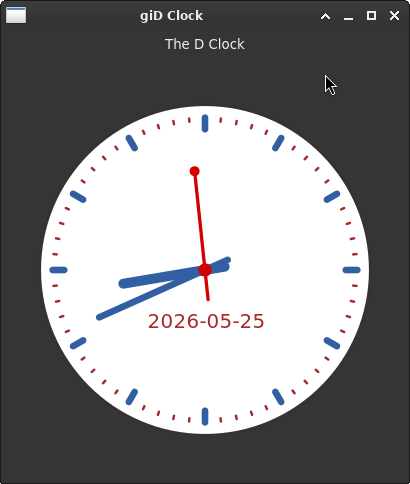 To run, save to clock.d and then `dub run --single clock.d`, and soon you will get the application window similar to the screenshot above, assuming you have GTK4 installed. PS. I could as easily embed entire WebKit into my giD-based application and have all the above, and more, so what do D developers get with sciter that separates it from the rest of the crowd? Code: ```d /+dub.sdl: name "gidex-clock" dependency "gid:gtk4" version="*" targetType "executable" +/ /// Analog clock application using gid:gtk4 and Cairo. /// Run with: dub run --single src/gidex/clock.d module gidex.clock; import std.datetime.systime; import core.stdc.stdio : sprintf; import gtk.application; import gtk.application_window; import gtk.box; import gtk.label; import gtk.types : Orientation; import gio.types : ApplicationFlags; import gio.application : GioApp = Application; import gtk.drawing_area; import cairo.context; import glib.global : timeoutAdd; enum PI = 3.1415926f; class ClockWindow : ApplicationWindow { DrawingArea drawingArea; this(gtk.application.Application app) { super(app); setTitle("giD Clock"); setDefaultSize(400, 450); auto box = new Box(Orientation.Vertical, 8); auto titleLbl = new Label("The D Clock"); titleLbl.setMarginTop(8); box.append(titleLbl); drawingArea = new DrawingArea(); drawingArea.setContentWidth(300); drawingArea.setContentHeight(300); drawingArea.setMarginStart(16); drawingArea.setMarginEnd(16); drawingArea.setVexpand(true); drawingArea.setHexpand(true); drawingArea.setDrawFunc(&drawClock); box.append(drawingArea); setChild(box); // Tick every second to keep the clock hands moving timeoutAdd(0, 1000, { drawingArea.queueDraw(); return true; }); } void drawClock(DrawingArea area, Context cr, int width, int height) { import std.math : cos, sin; import cairo.types; float cx = width / 2.0f; float cy = height / 2.0f; float radius = (cx < cy ? cx : cy) * 0.9f; // White clock face cr.setSourceRgba(1.0, 1.0, 1.0, 1.0); cr.arc(cx, cy, radius, 0, 2 * PI); cr.fill(); // Clock border cr.setSourceRgba(0.2, 0.2, 0.2, 1.0); cr.setLineWidth(radius * 0.02); cr.arc(cx, cy, radius, 0, 2 * PI); cr.stroke(); cr.setLineCap(LineCap.Round); // Hour marks cr.setLineWidth(radius * 0.04); foreach (i; 0 .. 12) { float angle = i * PI / 6.0f - PI / 2.0f; float inner = radius * 0.85f; float outer = radius * 0.92f; cr.moveTo(cx + inner * cos(angle), cy + inner * sin(angle)); cr.lineTo(cx + outer * cos(angle), cy + outer * sin(angle)); cr.stroke(); } // Minute marks cr.setSourceRgba(0.647, 0.165, 0.165, 1.0); // #A52A2A cr.setLineWidth(radius * 0.015); foreach (i; 0 .. 60) { if (i % 5 != 0) { float angle = i * PI / 30.0f - PI / 2.0f; float inner = radius * 0.9f; float outer = radius * 0.92f; cr.moveTo(cx + inner * cos(angle), cy + inner * sin(angle)); cr.lineTo(cx + outer * cos(angle), cy + outer * sin(angle)); cr.stroke(); } } // Current time SysTime now = Clock.currTime(); uint sec = now.second; uint min = now.minute; uint hr = now.hour; hr = hr >= 12 ? hr - 12 : hr; // Date text { char[20] buf; int written = sprintf(buf.ptr, "%04d-%02d-%02d", now.year, now.month, now.day); string dateStr = buf[0 .. written].idup; cr.setSourceRgba(0.647, 0.165, 0.165, 1.0); // brown cr.selectFontFace("Sans", FontSlant.Normal, FontWeight.Normal); cr.setFontSize(radius * 0.12); TextExtents te; cr.textExtents(dateStr, te); cr.moveTo(cx - te.width / 2.0, cy + radius * 0.35); cr.showText(dateStr); } // Hour hand { float angle = (hr * (PI / 6.0f) + (PI / 360.0f) * min + (PI / 21600.0f) * sec) - PI / 2.0f; cr.setSourceRgba(0.196, 0.373, 0.635, 1.0); cr.setLineWidth(radius * 0.06); cr.setLineCap(LineCap.Round); cr.moveTo(cx - radius * 0.12 * cos(angle), cy - radius * 0.12 * sin(angle)); cr.lineTo(cx + radius * 0.5 * cos(angle), cy + radius * 0.5 * sin(angle)); cr.stroke(); } // Minute hand { float angle = ((PI / 30.0f) * min + (PI / 1800.0f) * sec) - PI / 2.0f; cr.setSourceRgba(0.196, 0.373, 0.635, 1.0); cr.setLineWidth(radius * 0.04); cr.setLineCap(LineCap.Round); cr.moveTo(cx - radius * 0.15 * cos(angle), cy - radius * 0.15 * sin(angle)); cr.lineTo(cx + radius * 0.7 * cos(angle), cy + radius * 0.7 * sin(angle)); cr.stroke(); } // Second hand { float angle = sec * PI / 30.0f - PI / 2.0f; cr.setSourceRgba(0.831, 0.0, 0.0, 1.0); // #D40000 cr.setLineWidth(radius * 0.02); cr.setLineCap(LineCap.Round); cr.moveTo(cx - radius * 0.18 * cos(angle), cy - radius * 0.18 * sin(angle)); cr.lineTo(cx + radius * 0.6 * cos(angle), cy + radius * 0.6 * sin(angle)); cr.stroke(); // Small circle at tip cr.arc(cx + radius * 0.6 * cos(angle), cy + radius * 0.6 * sin(angle), radius * 0.03, 0, 2 * PI); cr.fill(); // Center dot cr.arc(cx, cy, radius * 0.04, 0, 2 * PI); cr.fill(); } } } class ClockApplication : gtk.application.Application { ClockWindow window; this() { super("org.example.gidex-clock", ApplicationFlags.DefaultFlags); connectActivate(&onActivate); } void onActivate(GioApp app) { if (!window) window = new ClockWindow(this); window.present(); } } void main(string[] args) { auto app = new ClockApplication; app.run(args); } ```

May 25
On Monday, 25 May 2026 at 19:55:56 UTC, Dejan Lekic wrote:On Thursday, 14 May 2026 at 20:56:22 UTC, c-smile wrote:But nevertheless you provide a sample that uses DOM and CSS 😛. GTK3 and GTK4 are using DOM similar to W3C DOM and CSS3 as it is. It is just instead of HTML they use XML for DOM tree serialization, here is Glade exhaust: ``` <object class="GtkWindow"> <property name="child"> <object class="GtkBox"> <property name="orientation">vertical</property> <child> <object class="GtkLabel"> <property name="label" translatable="1">my app</property> </object> </child> <child> <object class="GtkSpinner"> <property name="active">True</property> </object> </child> </object> </property> </object> ``` And as I said that GiD (GTK4) is of quite marginal use. Even on Linux. I have at least customer with very strict UI policy, their system is made of RPi's that run [Wayland / Cage Compositor](https://sciter.com/cage-scapp-sciter-in-kiosk-mode/) - single app full screen (a.k.a. kiosk mode). "We are not so rich to buy cheap things" (C) my grandma. To rephrase this: we are not so rich to design desktop applications for just 1% of desktop market.I've almost done with D version of [Sciter](https://sciter.com) SDK.HTML5, CSS3, DOM, JS for a GUI application is absolutely not necessary.
May 25
On Tuesday, 26 May 2026 at 02:04:27 UTC, c-smile wrote:

 But nevertheless you provide a sample that uses DOM and CSS 😛.

 GTK3 and GTK4 are using DOM similar to W3C DOM and CSS3 as it
 is. It is just instead of HTML they use XML for DOM tree
 serialization, here is Glade exhaust:

 ```
 <object class="GtkWindow">
     <property name="child">
       <object class="GtkBox">
         <property name="orientation">vertical</property>
         <child>
           <object class="GtkLabel">
             <property name="label" translatable="1">my
 app</property>
           </object>
         </child>
         <child>
           <object class="GtkSpinner">
             <property name="active">True</property>
           </object>
         </child>
       </object>
     </property>
   </object>
 ```

The only thing GTK "stole" from the web is CSS. It looks to me
like you believe GTK uses DOM - no it does not. It has own widget
tree, a strictly typed hierarchy built on GObject.

Finally, Sciter uses it on Linux it seems. So, it seems you opted
for using GTK's lower layer. I am not surprised, it is a good
choice. You could have used SDL instead, could you, but you
decided to use GTK... What is important is that it works for you
and your business!
May 26
On Tuesday, 26 May 2026 at 07:20:22 UTC, Dejan Lekic wrote:On Tuesday, 26 May 2026 at 02:04:27 UTC, c-smile wrote:But nevertheless you provide a sample that uses DOM and CSS 😛.The only thing GTK "stole" from the web is CSS. It looks to me like you believe GTK uses DOM - no it does not. It has own widget tree, a strictly typed hierarchy built on GObject.widget tree is DOM tree by any means. Moreover, CSS requires tree of elements/entities (see CSS selectors) to operate so collection of widgets MUST be represented as a tree.Finally, Sciter uses it on Linux it seems. So, it seems you opted for using GTK's lower layer. I am not surprised, it is a good choice. You could have used SDL instead, could you, but you decided to use GTK... What is important is that it works for you and your business!Sciter uses GTK4 optionally. If it detects that current WM uses GTK4 then it loads (dlopen/dlsym) needed GLib/GTK4 functions at runtime. Therefore libsciter.so does not require GTK4 to be present on a machine. If no GTK4 is running then Sciter uses either X11 or Wayland APIs directly. Whatever is present. GTK4 is used by Sciter to create desktop windows with proper chrome styling and system dialogs (file open/save). Everything inside the window is Sciter's DOM rendered by Skia on H/W accelerated OpenGLES surface. TL;DR: GiD requires GTK4 to be installed. Sciter does not.
May 26
On Tuesday, 26 May 2026 at 16:42:16 UTC, c-smile wrote:Sciter uses GTK4 optionally. If it detects that current WM uses GTK4 then it loads (dlopen/dlsym) needed GLib/GTK4 functions at runtime. Therefore libsciter.so does not require GTK4 to be present on a machine.So what will it use on my colleague's BSD running Window Maker (yes, he uses good, old WM!)?? Sounds like Sciter is the future of desktop GUI applications. You should give a demo on some of the BeerConfs or DConf!??
May 26
On Tuesday, 26 May 2026 at 16:42:16 UTC, c-smile wrote:widget tree is DOM tree by any means.Sorry but I had to comment on this nonsense. Firstly, the only two similarities between the two are: - Yes, they are both trees. - They both represent a hierarchy. And that is where similarities END! Now let's talk about differences... 1) Mutability In many GUI toolkits widget trees are completely immutable (Flutter is perfect example), while DOM is complete opposite - it is highly mutable where DOM node is a HEAVY, long-lived object! 2) Structural purpose DOM is "the end". It holds everything (styles, layout, structure). In widget-based world widget-tree is actually high-level abstraction, while at lower layers you _MUST_ have element-tree and at the lowest layer the "render-objects". 3) Memory footprint Widgets in the widget tree are DIRT CHEAP, while DOM nodes, as I mentioned above are inherently heavy. Creating and destroying DOM nodes is super slow. For the record, judging by what type of applications you do with Sciter I totally understand why Sciter works the way it does (I looked at the repo earlier today). It is obviously made for enterprise applications where UX is of paramount importance ("dress to impress"). Those of us who just need couple of forms to fill data probably will never need a toolkit like this, but those who do need slick UI on various device types are probably going to love your product! That is why you should definitely do a presentation on DConf once you have the Sciter/D ready to try.
May 26
On Tuesday, 26 May 2026 at 17:42:57 UTC, Dejan Lekic wrote:On Tuesday, 26 May 2026 at 16:42:16 UTC, c-smile wrote:GTK has exactly the same set of DOM/WOM tree mutating operations (append,prepend,remove): ```c GtkWidget *button = gtk_button_new_with_label("Click Me"); gtk_container_add(GTK_CONTAINER(page), button); ``` And JS (and you can that in D): ```js let button = document.createElement("button","Click Me"); page.append(button); ``` So what does immutability mean for you?widget tree is DOM tree by any means.1) Mutability In many GUI toolkits widget trees are completely immutable (Flutter is perfect example), while DOM is complete opposite - it is highly mutablewhere DOM node is a HEAVY, long-lived object!One more urban legend, sigh ... Sciter's DOM element is about `sizeof(void*) * 12 = 96 bytes` on x64. While `sizeof(struct _GtkWidget)` is 280–380 bytes per widget. Here is [sciter-internals.pptx](http://sciter.com/docs/sciter-internals.pptx) - slides of PowerPoint presentation if you want to know more.2) Structural purpose DOM is "the end". It holds everything (styles, layout, structure). In widget-based world widget-tree is actually high-level abstraction, while at lower layers you _MUST_ have element-tree and at the lowest layer the "render-objects".Quite opposite, it is `struct _GtkWidget` that holds everything styles, layout, structure. GTK4’s GtkWidgetPrivate contains (summarized): * Pointers: parent, layout manager, CSS node, first child, next sibling, controllers, action groups, tooltip, cursor, etc. * Geometry: allocation struct (4 ints), baseline, margins, expand flags * State flags (bitfields) * Event delivery flags * Opacity (double) * Name pointer * Tick callback list * Transform cache * Snapshot data * Misc bookkeeping3) Memory footprint Creating and destroying DOM nodes is super slow.Sorry, but that is untrue, real numbers: * Create 10k DOM nodes : 3–10 ms (Chrome/Firefox) * Create 10k Win32 HWND : 20–40 ms"dress to impress" stances...Check my [Sciter.Notes](https://notes.sciter.com/) application:  There is nothing fancy in its UI... Pure productive application, I deliberately made it matching e-mail app style for the least astonishment. But without Sciter it is quite hard to achieve. You do need to render HTML (note view), you do need WYSIWYG and Markdown editing. For Markdown you will need MD->HTML and HTML->MD parsers and the most mature libs for that are in JS. For the storage you would need something like NoSQL DB as data associated with notes and overall DB structure is fluid, etc.

May 26
On Tuesday, 26 May 2026 at 19:34:08 UTC, c-smile wrote:One more urban legend, sigh ...When i said DOM I should have said DOM in the sense of what we typically mean when we use this term - browser DOM. So no, it is not urban legend, it is the truth. Sciter, it seems to me, implements only ~30-40% of the DOM/CSS specification - just what application UIs actually need - while browsers must support the full spec plus legacy quirks, security sandboxing, mutation observers, live collections, DevTools hooks, and a separate accessibility tree for arbitrary untrusted web content. Browsers also maintain separate DOM → Layout → Paint → Compositing trees with pointers between them, while Sciter uses a more integrated design with fewer indirections. Simply put, Sciter is built to run *our* (Sciter users) trusted application UI efficiently, while browsers are built to run *any* untrusted website safely and completely - that difference alone accounts for the 5-8x node size reduction you are so proud of. Perhaps in the future conversation we should refer to Sciter-DOM when we talk about Sciter specifically, as you can't realistically claim Sciter follows the DOM/CSS specification "to the letter". I do like Sciter! Just let's not spread BS here and let's be realistic.
May 26